How to Add Live Location, Date & Time on Photos (Without EXIF)

In the digital age, a professional photograph is more than just a visual record; it is a critical piece of data. For field engineers, real estate appraisers, and delivery agents, that data must include precise proof of exactly where and when the photo was taken. Most digital cameras and smartphones store this as EXIF metadata—hidden text tucked deep inside the file header.
However, EXIF data is notoriously fragile. It is easily stripped by messaging apps, modified by malicious actors, or lost during format conversions. If you need an immutable, undeniable way to add location to photo online, visual stamping is the only definitive method to ensure your data survives transmission and remains permanent.
Table of Contents
The Technical Problem with Hidden Metadata
Have you ever taken a photo on site, sent it to your project manager via WhatsApp or Slack, and had them complain that the location details vanished? This is a deliberate feature of modern software, not a bug.
When you share an image, platforms execute aggressive compression algorithms to save bandwidth. During this process, they intentionally strip the EXIF header (which contains the GPSLatitude, GPSLongitude, and DateTimeOriginal tags) to protect consumer privacy. While this prevents strangers from tracking a user's home address on social media, it is a disaster for professionals who rely on that data for daily site inspections and compliance reports.
EXIF Data vs. Visual GPS Stamps
While hidden metadata is helpful for personal digital storage and cataloging in tools like Lightroom, a visual GPS photo stamp provides immediate, public accountability that survives all platform compression.
| Feature Comparison | Hidden EXIF Metadata | Visual GPS Stamps |
|---|---|---|
| Visibility | Hidden deep in file properties | Visible directly on the photo pixels |
| WhatsApp/Socials | Automatically stripped during upload | Remains 100% permanent |
| Verification | Requires technical software to extract | Instant visual proof for any stakeholder |
| Tamper Resistance | Easily altered with free desktop apps | Requires complex pixel-level forgery |
Why Professionals Require Visual Stamps
In heavily regulated industries like construction, insurance adjustments, and commercial real estate, "I was there" isn't a valid defense. You need objective proof. Placing a professional location watermark on photos ensures your reports are legally robust.
A visual stamp merges the geographical data with the visual context. If an auditor questions whether a specific foundation pour happened on a Tuesday in a specific sector, a photo bearing a burnt-in coordinate stamp, timestamp, and map inset leaves no room for debate. It eliminates the "he-said, she-said" nature of field disputes and expedites milestone payments.
The Mechanics of Browser-Based Stamping
A frequent question is how a browser tool can be as accurate as a downloaded mobile app. The answer lies in the HTML5 Geolocation API.
When you use our online GPS map camera, the browser securely requests coordinate data from the exact same internal hardware that native iOS or Android apps use: the GNSS chip (communicating with GPS, GLONASS, and Galileo satellites), local WiFi positioning nodes, and cellular triangulation. The resulting coordinates are identical to native apps, but you avoid the battery drain, heavy storage requirements, and invasive background tracking associated with app store downloads.
Step-by-Step: Adding Live Location Stamps
You do not need a degree in GIS (Geographic Information Systems) to accurately tag your images. Our utility makes it a frictionless, three-step process:
Step 1: Upload or Capture
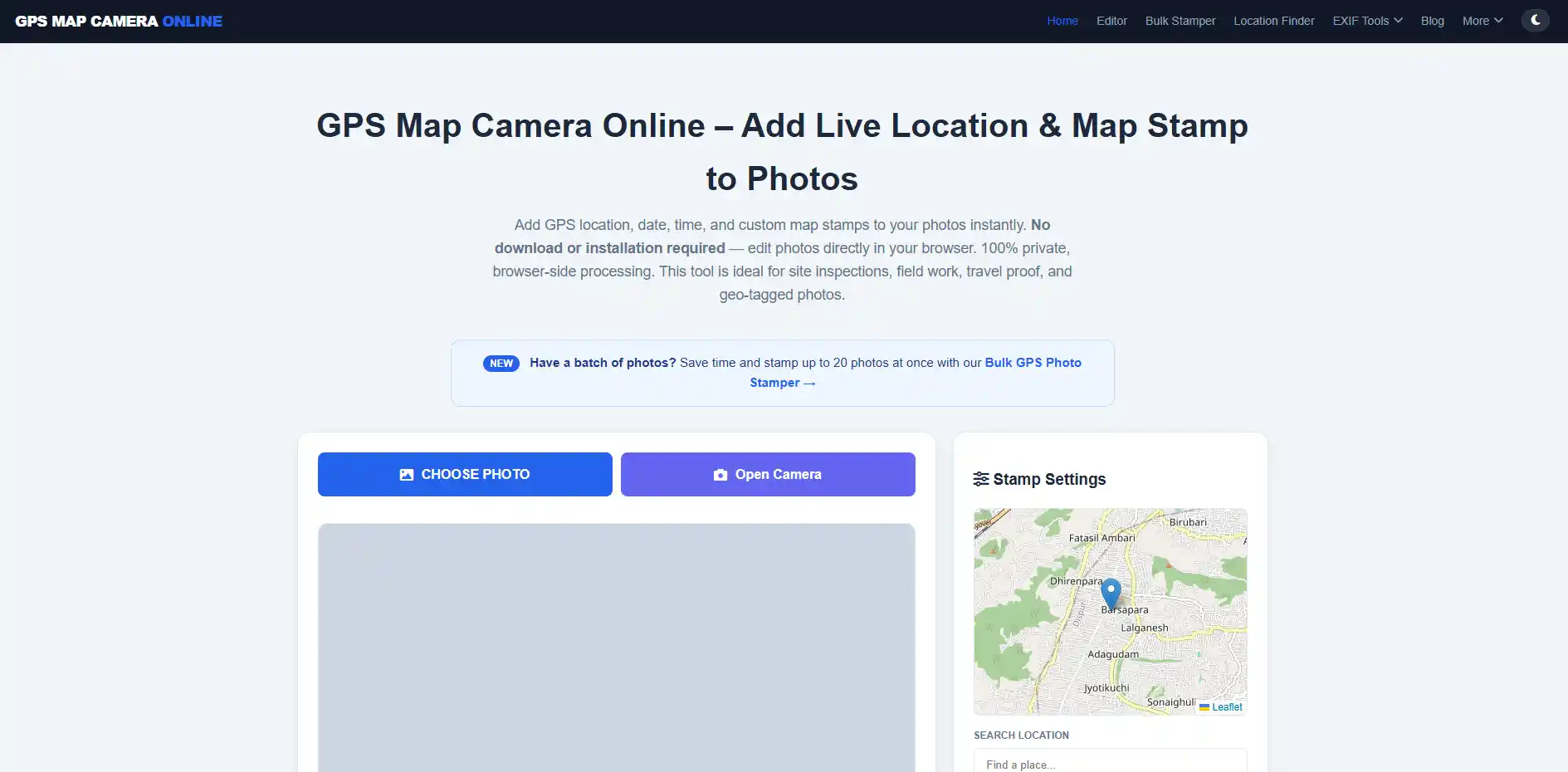
Navigate to our homepage. You can either upload a pre-existing photo from your device's gallery or use the "Open Camera" feature to snap a live photo. For the highest possible GPS accuracy on live captures, ensure you are outdoors with a clear, unobstructed view of the sky.
Step 2: Calibrate Location & Permissions
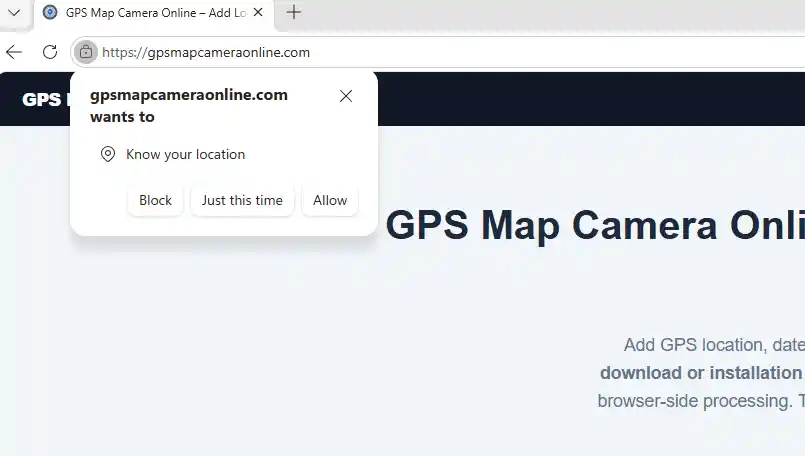
The browser will request location permission. Always click "Allow." The tool will instantly query the HTML5 API to fetch your latitude, longitude, and reverse-geocode your current street address. If you need to pinpoint a specific zone on a massive job site, utilize the "Project Name" or "Custom Notes" field to manually add necessary context to your stamp.
Step 3: Choose Style & Render
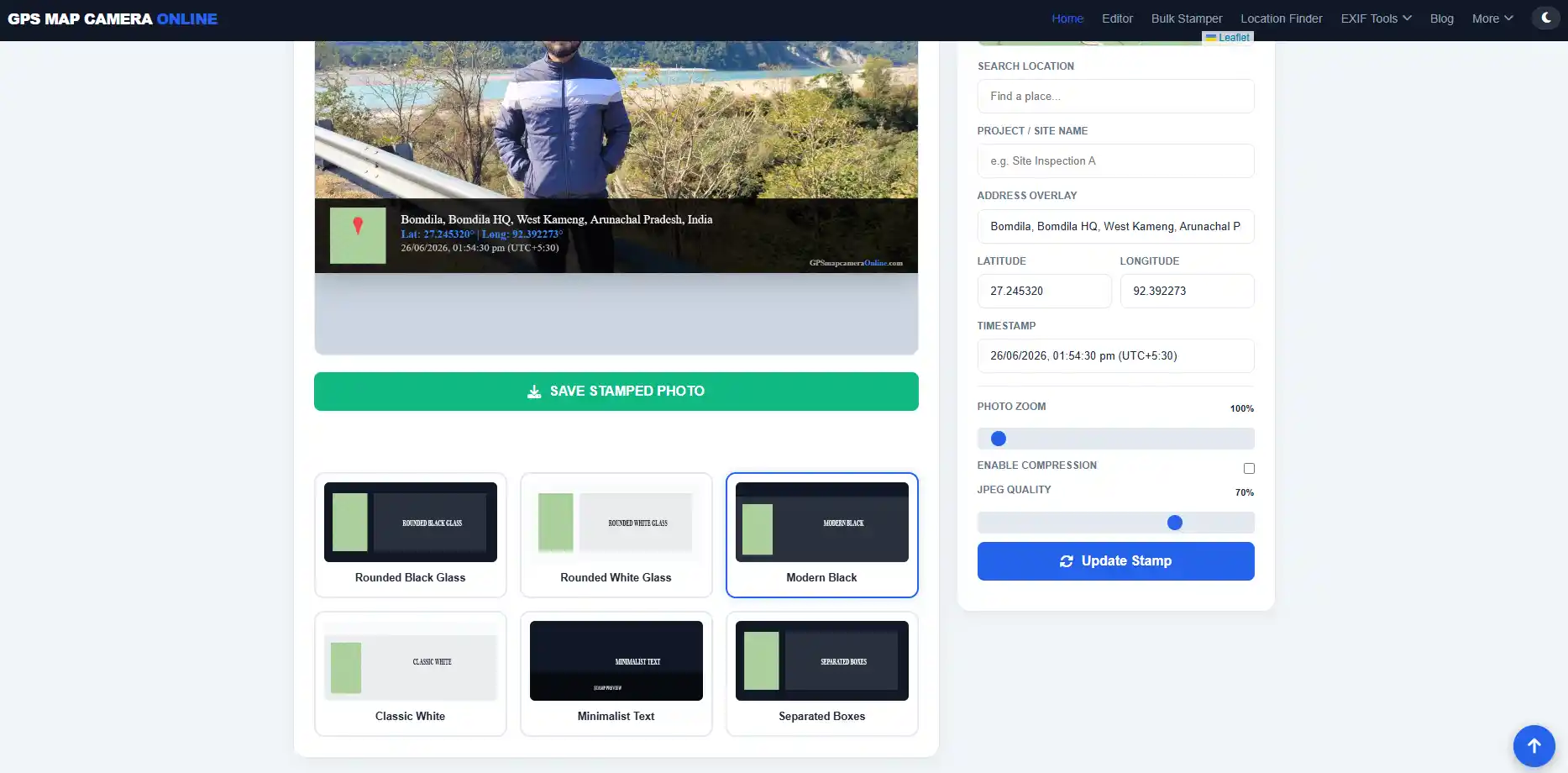
We offer multiple professional stamp layouts, ranging from "Minimalist Text" to "Rounded Black Glass" with map overlays. Select the format that matches your firm's reporting standards. Click "Save Stamped Photo." The browser's HTML Canvas will merge the text, map, and image locally, downloading the finalized file directly to your device.
Privacy: The Client-Side Advantage
Corporate data privacy is a massive concern in 2026. Many "free" mobile applications monetize by tracking your background location and selling your movement data to third-party brokers. Furthermore, uploading sensitive photos of private property to an unknown cloud server violates strict compliance frameworks like GDPR or CCPA.
Our tool utilizes Client-Side Processing. When you capture a photo and apply a stamp, all of the rendering happens strictly within your browser's temporary memory (RAM). Your photos, coordinates, and project notes never leave your device. We do not maintain a database of your images.
If you're still deciding between adopting a web tool or managing a fleet of native store apps for your team, read our comprehensive technical breakdown on GPS Map Camera Online vs Mobile Apps.
Frequently Asked Questions
Ready to make your location data permanent?
Add professional GPS stamps to your photos for free. No app required, no tracking.
Start Stamping Now
Priyanshu built GPS Map Camera Online after running into privacy issues and slow performance with traditional mobile GPS camera apps. He specialises in browser-based tools for field documentation and photo geotagging — keeping everything fast, private, and free.
View all posts →