Select a geotagged smartphone photo to view its location on the map
Supports JPEG photos with embedded GPS metadata
The fastest way to identify location from photo online free. Upload any geotagged JPEG and instantly find photo location — GPS coordinates and a full street address displayed on an interactive map. No sign-up, no server uploads, 100% private.
Select a geotagged smartphone photo to view its location on the map
Supports JPEG photos with embedded GPS metadata
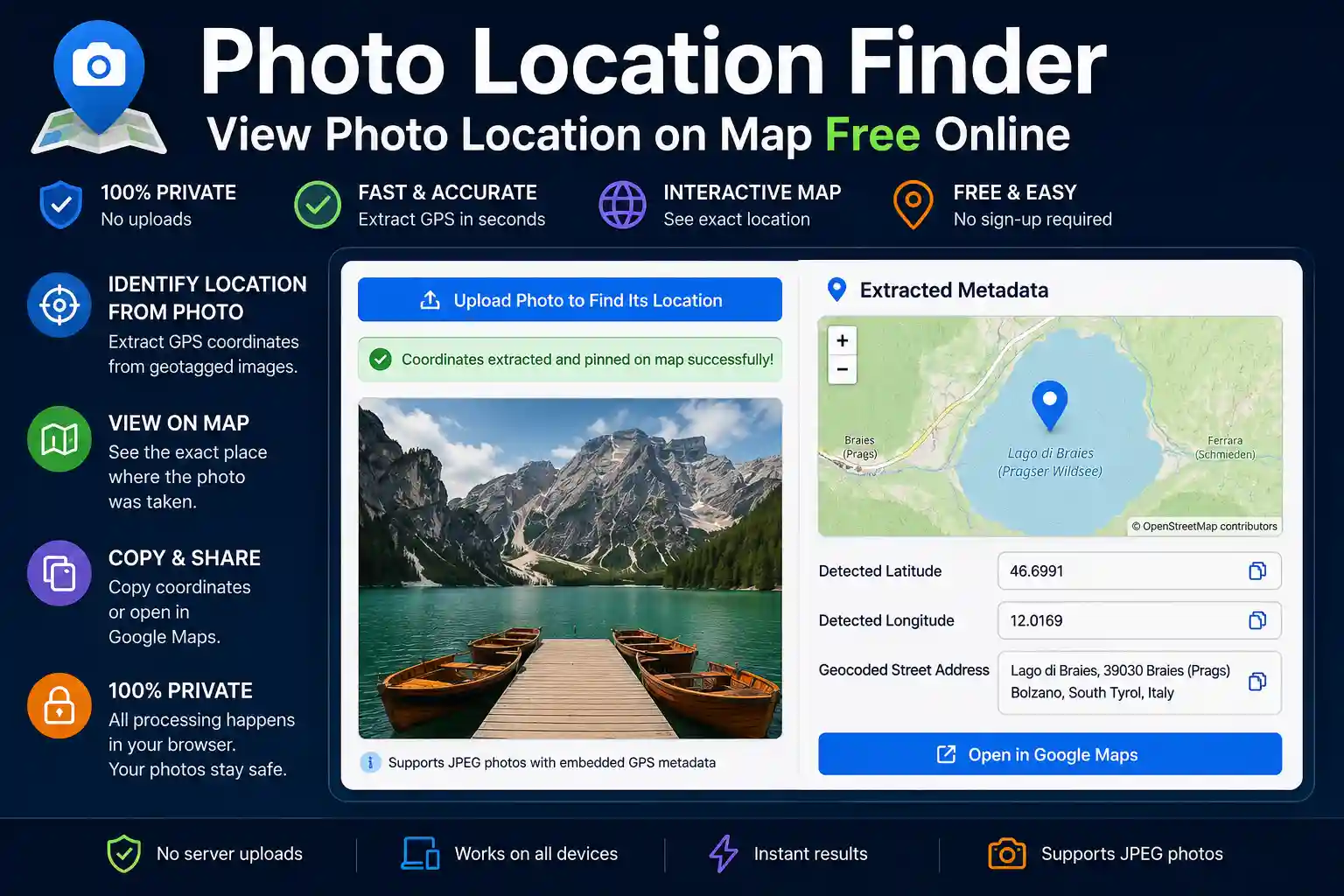
Every JPEG taken on a smartphone or GPS-enabled camera carries invisible data stitched right into the file — your exact coordinates at the moment you pressed the shutter. This photo location finder reads that embedded GPS information and plots it on an interactive map, without uploading your image anywhere. Everything happens locally in your browser, in seconds.
This tool is useful whenever you need to answer the question: where exactly was this photo taken? — whether that's a travel shot from three years ago, a property inspection image, or a news photo you want to verify.
Modern cameras and smartphones store metadata inside every JPEG using a standard called EXIF (Exchangeable Image File Format). When location services are enabled, the GPS receiver records latitude, longitude, altitude, and bearing at the moment of capture. This data is embedded silently — most people never know it's there.
EXIF GPS coordinates are stored in DMS format (Degrees, Minutes, Seconds) with a hemisphere reference (N/S for latitude, E/W for longitude). This tool converts those values to decimal degrees, then passes them to OpenStreetMap for display and to a reverse geocoder to produce a readable street address.
A few important caveats worth knowing before you start:
Understanding these limitations saves time: if the tool shows "No GPS metadata found," that's accurate — it doesn't mean the tool is broken.
The process is straightforward even if you've never looked at image metadata before:
It's worth being direct about the tool's capabilities so you get the right result every time.
What it does: reads embedded EXIF GPS coordinates from JPEG images and displays them on a map with a reverse-geocoded address. If coordinates exist in the file, this tool will find them reliably.
What it does not do: it cannot determine the location of a photo that has no GPS metadata. It does not perform AI-based visual geolocation (analysing landmarks, skylines, or terrain to guess a location). If you have a photo with no EXIF data and want to identify its location visually, that requires a different approach — such as comparing landmarks in the image using Google Maps Street View manually, or specialist reverse image geolocation services.
This distinction matters. Many users arrive expecting any photo to be locatable. The tool is highly accurate when GPS data is present, and honest when it isn't.
The use cases are more varied than you might expect:
The image you upload is processed entirely within your browser using JavaScript. It is not sent to our servers, not stored in a cloud service, and not retained after you close the tab. The only external request this tool makes is the reverse geocoding lookup, which sends only the extracted GPS coordinates (two numbers) to the Nominatim API to retrieve an address — your image is never part of that request.
This matters for photos that contain sensitive content — personal property, faces, confidential sites. You can use this tool with confidence that the image itself doesn't leave your device.
Not with this tool. This finder reads embedded EXIF GPS coordinates — if those aren't present, there's nothing to extract. For photos without GPS metadata, visual geolocation (manually identifying landmarks) is the only alternative. Common reasons GPS data is missing: location services were off, the photo was shared via social media (which strips it), or the image was edited with an app that removes metadata on export.
Yes, provided "Location" access is enabled for your Camera app in iOS Settings → Privacy → Location Services. iPhones store GPS coordinates in the standard EXIF format that this tool reads. If you take an original iPhone photo and upload it directly without sharing it through a messaging app first, the GPS data should be present.
Same principle. On Android, go to Camera Settings and ensure location tagging or "Save location" is enabled. Google Photos and Samsung Gallery both preserve EXIF when exporting the original file. If you share via WhatsApp or social media first, the GPS data will have been stripped.
The GPS coordinates extracted from the EXIF data are accurate to what the device recorded — typically within 5–10 metres for a modern smartphone under clear sky conditions. The reverse geocoding lookup converts those coordinates to the nearest addressable location in the Nominatim database. In rural or remote areas, the address returned may be approximate (a road name or district rather than a specific street number), but the map pin placement is always accurate to the actual coordinates.
Yes. The tool works in mobile browsers on Android and iPhone. You can upload directly from your phone's photo gallery. Note that iOS Safari sometimes requires you to select "Photo Library" rather than the Camera option when uploading, to access an existing image.
No. Processing is entirely browser-side. Your image never reaches our server. The only network request is the reverse geocoding lookup, which sends only the two coordinate numbers. Once you close the tab, nothing persists.

Priyanshu built GPS Map Camera Online after running into privacy issues and slow performance with traditional mobile GPS camera apps. He specialises in browser-based tools for field documentation and photo geotagging — keeping everything fast, private, and free.
View all posts →